1. View and Components
1.1 View
-
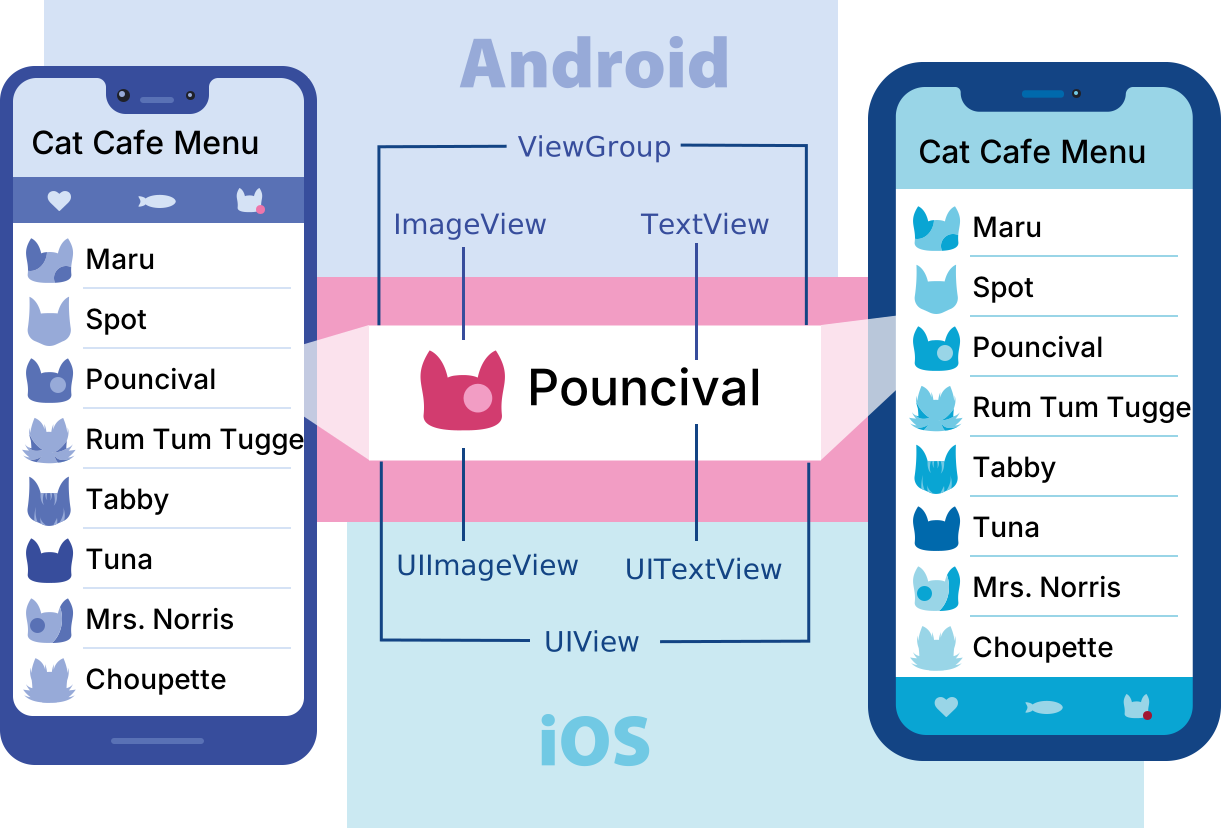
위 그림은 각각 Android와 iOS에서 화면을 그릴 떄, 쓰는 컴포넌트들을 보여준다.
-
리스트들 중에서 하나의 아이템을 표현할 떄,
- Android는 ViewGroup으로 감싸고, 그 안쪽 아이콘은 ImageView, 글자는 TextView 컴포넌트를 사용
- iOS는 UIView으로 감싸고, 그 안쪽 아이콘은 UIImageView, 글자는 UITextView 컴포넌트를 사용
-
그러면 React Native에서는 각 OS별 컴포넌트들을 어떤 걸로 대체해야 할까?
- 바로 Native Component이다.
-
cf. https://reactnative.dev/docs/intro-react-native-components
1.2 Native Component
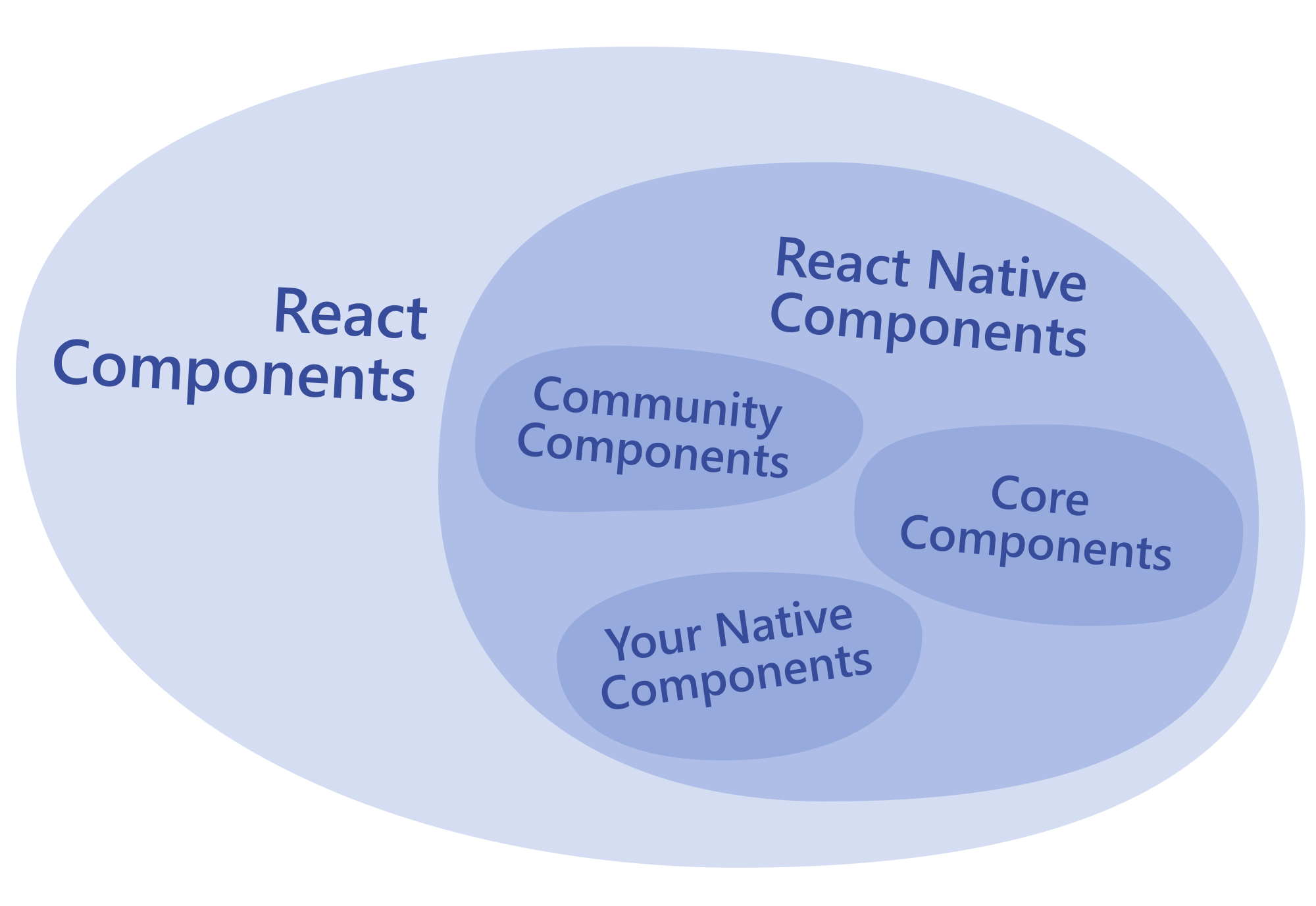
Native Components: 플랫폼(iOS 또는 Android)의 view를 JS로 호출할 수 있게 해주는 React 컴포넌트
- 코드를 작성할 땐, JavaScript와 React Component
- Runtime에서 React Native가 구현한 코드에 상응하는 안드로이드와 iOS view를 생성함
- 다른 사람이 만든 Native Component를 사용할 수도 있음: React Native Directory
1.3 대표적인 Core Components
| REACT NATIVE UI COMPONENT | ANDROID VIEW | IOS VIEW | WEB ANALOG | DESCRIPTION |
|---|---|---|---|---|
<View> | <ViewGroup> | <UIView> | A non-scrolling <div> | flexbox, 스타일, 일부 터치 처리, 접근성 컨트롤을 지원하는 컨테이너 |
<Text> | <TextView> | <UITextView> | <p> | 텍스트 문자열을 표시, 스타일링하고 중첩하며, 심지어 터치 이벤트를 처리 |
<Image> | <ImageView> | <UIImageView> | <img> | 다양한 유형의 이미지를 표시 |
<ScrollView> | <ScrollView> | <UIScrollView> | <div> | 여러 컴포넌트와 뷰를 포함할 수 있는 일반 스크롤 컨테이너 |
<TextInput> | <EditText> | <UITextField> | <input type="text"> | 사용자가 텍스트를 입력할 수 있게 함 |
Core Components: React Native가 기본적으로 제공하는 Native Components 세트- 그 외 모든 Core Component는 공식 문서 Core Components and APIs · React Native를 확인
2. Core Components 예시
2.1 Text Input
<TextInput>: html에서의<input type="text">와 동일- 유저의 텍스트 입력을 받을 수 있는 컴포넌트
- cf. https://reactnative.dev/docs/next/handling-text-input
1import React, { useState } from 'react'2import { Text, TextInput, View } from 'react-native'34const PizzaTranslator = () => {5const [text, setText] = useState('')67return (8<View style={{ padding: 100 }}>9<TextInput10style={{ height: 40 }}11placeholder="Type here to translate!"12onChangeText={newText => setText(newText)}13defaultValue={text}14/>15<Text style={{ padding: 10, fontSize: 42 }}>16{text17.split(' ')18.map(word => word && '🍕')19.join(' ')}20</Text>21</View>22)23}2425export default PizzaTranslator
2.2 Scroll View
View는 2가지 종류가 있다.<View>: 스크롤이 불가능한<div><ScrollView>: 스크롤 가능한<div>
- 스크롤 가능한 컨테이너를 만드려면
<ScrollView>를 사용해야 합니다. - cf. https://reactnative.dev/docs/next/using-a-scrollview
1import React from 'react'2import { Image, ScrollView, Text } from 'react-native'34const logo = {5uri: 'https://reactnative.dev/img/tiny_logo.png',6width: 64,7height: 64,8}910const App = () => (11<ScrollView>12<Text style={{ fontSize: 96 }}>Scroll me plz</Text>13<Image source={logo} />14<Image source={logo} />15<Image source={logo} />16<Image source={logo} />17<Image source={logo} />18<Text style={{ fontSize: 96 }}>If you like</Text>19<Image source={logo} />20<Image source={logo} />21<Image source={logo} />22<Image source={logo} />23<Image source={logo} />24<Text style={{ fontSize: 96 }}>Scrolling down</Text>25<Image source={logo} />26<Image source={logo} />27<Image source={logo} />28<Image source={logo} />29<Image source={logo} />30<Text style={{ fontSize: 96 }}>What's the best</Text>31<Image source={logo} />32<Image source={logo} />33<Image source={logo} />34<Image source={logo} />35<Image source={logo} />36<Text style={{ fontSize: 96 }}>Framework around?</Text>37<Image source={logo} />38<Image source={logo} />39<Image source={logo} />40<Image source={logo} />41<Image source={logo} />42<Text style={{ fontSize: 80 }}>React Native</Text>43</ScrollView>44)4546export default App
iOS의 경우, ScrollView에서 줌이 가능하게 할 수 있음
maximumZoomScale: 최대 줌 스케일 설정minimumZoomScale: 최소 줌 스케일 설정
1<ScrollView minimumZoomScale={1.0} maximumZoomScale={2.0}>2<!-- ~~~ -->3</ScrollView>
iOS 시뮬레이터에서 pinch 줌을 하려면?
- option키를 누르고 드래그
스크롤뷰는 화면에는 안보이는 아이템도 한번에 랜더링 해버림 → 많은 아이템이 있다면 랜더링 시간 길어짐
- 아이템이 많다면 **List View**를 사용.
2.3 List View
2.3.1 FlatList
- 화면에 현재 보이는 부분만 먼저 랜더링 됨
- props 설명
data: 출력하고자 하는 모든 아이템들의 정보를 array(list) 형태로 전달renderItem: 각 요소들을 어떤 포맷으로 출력할 것인지 구현하는 곳keyExtractor: 각 아이템마다 unique한 key 값을 줌 (React에서의 key와 동일한 역할)
- cf. https://reactnative.dev/docs/next/using-a-listview
1import React from 'react'2import { FlatList, StyleSheet, Text, View } from 'react-native'34const styles = StyleSheet.create({5container: {6flex: 1,7paddingTop: 22,8},9item: {10padding: 10,11fontSize: 18,12height: 44,13},14})1516const FlatListBasics = () => {17return (18<View style={styles.container}>19<FlatList20data={[21{ key: 'Devin' },22{ key: 'Dan' },23{ key: 'Dominic' },24{ key: 'Jackson' },25{ key: 'James' },26{ key: 'Joel' },27{ key: 'John' },28{ key: 'Jillian' },29{ key: 'Jimmy' },30{ key: 'Julie' },31]}32renderItem={({ item }) => <Text style={styles.item}>{item.key}</Text>}33/>34</View>35)36}3738export default FlatListBasics
2.3.2 SectionList
- FlatList들을 구분할 수 있는 세션 헤더가 존재 (iOS의
UITableView와 비슷함) - props 설명
sections: 출력하고자 하는 모든 Section의 정보를 array(list) 형태로 전달- (각 세션은 FlatList이기 때문에 FlatList의 props에 대한 정보를 정의해야 함)
renderItem: 각 아이템들을 어떤 포맷으로 출력할 것인지 구현하는 곳renderSectionHeader: 세션을 구분하는 헤더를 구현하는 곳keyExtractor: 각 아이템마다 unique한 key 값을 줌 (React에서의 key와 동일한 역할)
- cf. https://reactnative.dev/docs/sectionlist
1import React from 'react'2import { StyleSheet, Text, View, SafeAreaView, SectionList, StatusBar } from 'react-native'34const DATA = [5{6title: 'Main dishes',7data: ['Pizza', 'Burger', 'Risotto'],8},9{10title: 'Sides',11data: ['French Fries', 'Onion Rings', 'Fried Shrimps'],12},13{14title: 'Drinks',15data: ['Water', 'Coke', 'Beer'],16},17{18title: 'Desserts',19data: ['Cheese Cake', 'Ice Cream'],20},21]2223const SectionListBasics = () => (24<SafeAreaView style={styles.container}>25<SectionList26sections={DATA}27keyExtractor={(item, index) => item + index}28renderItem={({ item }) => (29<View style={styles.item}>30<Text style={styles.title}>{item}</Text>31</View>32)}33renderSectionHeader={({ section: { title } }) => <Text style={styles.header}>{title}</Text>}34/>35</SafeAreaView>36)3738const styles = StyleSheet.create({39container: {40flex: 1,41paddingTop: StatusBar.currentHeight,42marginHorizontal: 16,43},44item: {45backgroundColor: '#f9c2ff',46padding: 20,47marginVertical: 8,48},49header: {50fontSize: 32,51backgroundColor: '#fff',52},53title: {54fontSize: 24,55},56})5758export default SectionListBasics