1. Websocket 이론
- 채팅 서비스, 주식 관련 서비스, 가상화폐 서비스 같은 걸새로고침을 하지 않아도 서버에서 정보를 던져준다.
- 웹소켓을 사용하시면. 이런 리얼타임 서비스를 저희가 구현할 수 있다.
1// ************* 기존 클라이언트-서버 구조2┌───────────┐ ┌───────────┐3│ │ ───────── (요청) ───────> │ │4│ 클라이언트 │ │ 서버 │5│ │ <──────── (응답) ──────── │ │6└───────────┘ └───────────┘
- 기존의 클라이언트-서버 구조의 문제점은 단일 방향이라는 점이다.
- 즉, 클라이언트에서부터 요청을 보내야지만, 요청한 거에 대한 응답을 받을 수 있다.
1// ************* WebSocket2┌───────────┐ ┌───────────┐3│ │ <───── (요청, 응답) ─────> │ │4│ 클라이언트 │ │ 서버 │5│ │ <───── (요청, 응답) ─────> │ │6└───────────┘ └───────────┘
- e.g.) 채팅은 누가 메시지를 보내면, 사용자 따로 뭘 하지 않아도(요청하지 않아도) 메시지가 온다.
- 이것이 real-time communication이고, 웹소켓이 해결해준다.
- 그래서 이제는 양방향으로 커뮤니케이션을 할 수가 있게 된다.
2. Socket IO 이론

- 공식문서 : https://socket.io/docs/v4/
Socket IO는 Websocket 프로토콜을 사용해서 만든- low-latency(낮은 지연시간), bidirectional(양방향 소통), event based(이벤트 기반)으로
- 클라이언트와 서버가 통신할 수 있게 해주는 기능이다.
- 즉, Socket IO는 결국에 웹소켓이다.
2.1 기본적인 통신법. emit & on
emit: 메시지를 보내는 것on: 보낸 메시지를 리스닝하는 것
서버 코드
1import { Server } from 'socket.io'23// Socekt.IO 서버 생성4const io = new Server(3000)56/** 📌 on() : 클라이언트가 서버에 연결되면 실행되는 함수 정의7* on 함수를 실행하면 특정 이벤트(1번쨰 파라미터)가 있을떄,8* 콜백 함수를 실행할 수 있으며, (2번쨰 파라미터)9* 해당 콜백 함수는 메시지를 1번쨰 파라미터로 받는다.10* connection 이벤트는 미리 정의된 이벤트로 "연결됐을 떄" 실행한다.11*/12io.on('connection', socket => {13/** 📌 emit() : 메시지 보내기14* 1번 파라미터, 이벤트 이름15* 2번~이후 파라미터, 메시지16*/17socket.emit('hello_form_server', 'this is message from server')1819socket.on('hello_from_client', message => {20// 'this is message from clinet'21console.log(message)22})23})
클라이언트 코드
1import { io } from 'socket.io-client'23// 📌 (1) Socket.IO 서버에 연결4const socket = io('ws://localhost:3000') // ws는 웹소캣의 약어56// 'hello_from_clint' 이벤트를 듣고 있는 소켓에 메시지 보내기7socket.emit('hello_form_server', 'this is message from server')89// 'hello_from_server' 이벤트로 메시지가 오면 함수 실행하기10socket.on('hello_from_client', message => {11// 'this is message from clinet'12console.log(message)13})
- 웹소켓 연결은 무조건 클라이언트에서 먼저 시작한다.
- 연결한 뒤에는 메시지를 서버가 먼저 보내든, 클라이언트가 먼저 보내든 상관없다.
2.2 Acknowledgement
Acknowledgement는 한마디로 메시지를 잘 받았다고 ok 신호를 보내주는 겁니다.
서버 코드
1/**2* 'hello' 룸에 'world'라는 메시지를 보낸다.3* 3번쨰 파라미터는 콜백 함수로 ㅁcknowledgment가 오면 실행한다.4*/5socket.emit('hello', 'world', response => {6console.log(response) // 수산 양호7})
클라이언트 코드
1/**2* 1번쨰 파라미터 : 이벤트 이름3* 2번쨰 파라미터 : 메시지가 왔을 떄 실행할 함수4* 함수는 1번째 파라미너톨 메시지,5* 2번쨰 파라미터로 수신 응답할 수 있는 콜백함수가 주어짐6*/7socket.on('hello', (message, callback) => {8console.log(message) // world9callback('수신 양호') // 📌 emit을 날린 곳으로 다시 돌아감10})
2.3 Namespace & Room
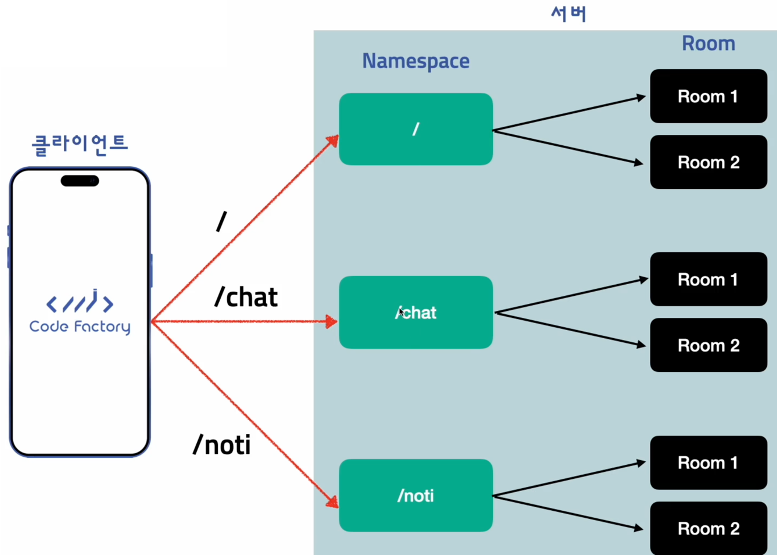
- 클라이언트(모바일, 웹)가 서버에 socket.io 요청들을 넣을떄,
- 아무것도 정의하지 않으면 namespace가 기본으로
/가 정의된다. - 아무것도 넣지 않고 emit하면
/namespace로 정의된다.
- 아무것도 정의하지 않으면 namespace가 기본으로
- REST API에서 path를 짜듯이, Namespace라는 거를 만들게 된다.
- 여러 개의 Namespace가 있으면, 원하는 Namespace를 골라서 요청할 수 있다
- 근데 서버에서는 namespace 안에서 또 Room으로 나눌 수가 있다.
/chat에 요청을 넣고 채팅을 한다.- 이떄
/chat의 각각의 룸들은 카톡에서 각각의 채팅방 리스트와 같다. - 그리고
/noti/room1과/chat/room1은 완전 다르고, 연결이 안된다.
2.4 Namespace & Room (Server)
1/***2* of를 이용하면 namespace를 정할 수 있다.3* namespace는 일반적으로 라우트 형태를 따라 지정한다.4*/5const chatNamespace = io.of('/chat')67// chatNmaespace에 연결된 소켓만 아래 코드가 실행된다.8chatNamespace.on('connection', socket => {9/***10* 현재 연결된 socket을 room1에 연결한다.11* 이 room1은 /chat namespace에만 존재하는 room이다.12*/13socket.join('room1')14chatNamespace.to('room1').emit('hello', 'world')15})1617// /noti namespace 생성18const notiNamespace = io.of('/noti')1920// /noti chatNmaespace에 연결된 소켓만 실행된다.21chatNamespace.on('connection', socket => {22/***23* 이 room1은 /chat namespace의 room1과 전혀 관련이 없다.24* 다른 namespace의 room1에는 들어갈 수 없다.25*/26socket.join('room1')2728// 역시나 /noti namespace의 room1에만 메시지를 보낸다.29chatNamespace.to('room1').emit('hello', 'world')30})
2.5 Namespace & Room (Client)
1// 기본 namespace로 연결 -> /2const socket = io('ws://localhost:3000') // ws는 웹소캣의 약어34// 기본 namespace로 연결 -> /chat5const chatSocket = io('ws://localhost:3000/chat')67// 기본 namespace로 연결 -> /noti8const notiSocket = io('ws://localhost:3000/noti')910/**11* client에서는 room을 정할 수 있는 기능이 없다.12* room은 서버에서만 socket.join()을 실행해서,13* 특정 room에 들어가도록 할 수 있다.14*/
2.6 Emit & Broadcast
1// 연결된 모든 socket들에게 메시지를 보낸다2socket.emit('hello', 'world')34// 나 빼고 모두에게 메시지를 보낸다5socket.broadcast.emit('hello', 'world')
3. Gateway 생성하고 메시지 리스닝하기
먼저 3개의 패키지를 설치한다.
1yarn add @nestjs/websockets @nestjs/platform-socket.io socket.io
그리고 버전 충돌을 막기 위해 nest 패키지들을 다시 설치한다. 이렇게 아래 패키지들을 다시설치하면 메이저 버전들이 맞춰진다.
- @nestjs/common @nestjs/core @nestjs/jwt @nestjs/platform-express
- @nestjs/platform-socket.io @nestjs/typeorm @nestjs/websockets
- 그러면 이 패키지들에
^10.3.0이런 식으로 앞에^(캐럿)이 붙는다.
1yarn add @nestjs/common @nestjs/core @nestjs/jwt @nestjs/platform-express @nestjs/platform-socket.io @nestjs/typeorm @nestjs/websockets
이제 chats resource를 생성한다.
1$ nest g resource2? What name ? chats3? What transport layer do you use? REST API4? Would you like to generate CRUD entry points? No
chats/chats.gateway.ts 파일을 만든다.
1import { MessageBody, OnGatewayConnection, SubscribeMessage, WebSocketGateway } from '@nestjs/websockets'2import { Socket } from 'socket.io'34@WebSocketGateway({5// ws://localhost:3000/chats6namespace: 'chats',7})8export class ChatsGateway implements OnGatewayConnection {9handleConnection(socket: Socket) {10console.log(`on connect called : ${socket.id}`)11}1213// socket.on('send_message', (message)=>{ console.log(message)})14@SubscribeMessage('send_message')15sendMessage(@MessageBody() message: string) {16console.log(message)17}18}
위에서 만든 gateway를 등록하기 위해 chats 모듈에서 provider에 넣어준다.
1import { Module } from '@nestjs/common'2import { ChatsService } from './chats.service'3import { ChatsController } from './chats.controller'4import { ChatsGateway } from './chats.gateway'56@Module({7controllers: [ChatsController],8providers: [ChatsGateway, ChatsService],9})10export class ChatsModule {}
postman에 위쪽 new 버튼을 클릭하면, socket.io가 있다.
- 새 프로젝트를 만들고. socket.io 요청으로
User 1 /chats라고 만든다. ws://{{host}}/chats로 connect 요청을 보낸다.- 웹소켓 서버가 잘 생성되었으면, 터미널창에 아래와 같이 잘 연결되었다고 미리 작성해둔 메시지가 뜬다.
on connect called : xaTkfZRExjMqwUr0AAAB
- 포스트맨에서 emit하는 법은 Message 탭에서 써주고, 아래 Ack에 이벤트명을 넣어주면 된다.
- Message에 적을 내용 : hello form clinet
- Ack 이벤트명 : send_message
4. 서버에서 이벤트 전송
이 namespace에 연결된 모든 소켓들한테 메시지를 보내는 기능을 만들자.
1import {2MessageBody,3OnGatewayConnection,4SubscribeMessage,5WebSocketGateway,6WebSocketServer,7} from '@nestjs/websockets'8import { Server, Socket } from 'socket.io'910@WebSocketGateway({11// ws://localhost:3000/chats12namespace: 'chats',13})14export class ChatsGateway implements OnGatewayConnection {15@WebSocketServer()16server: Server1718handleConnection(socket: Socket) {19console.log(`on connect called : ${socket.id}`)20}2122// socket.on('send_message', (message)=>{ console.log(message)})23@SubscribeMessage('send_message')24sendMessage(@MessageBody() message: string) {25this.server.emit('receive_message', 'hello from server')26}27}
포스트맨에서 서버에서 오는 메시지를 리스닝하려면,
- Events 탭에서 파라미터를 넣는 것처럼 이벤트를 넣어주면 된다.
| EVENTS | LISTEN | DESCRIPTION |
|---|---|---|
| receive_message | 체크 |
포스트맨에서 socket.io 요청을 만들고 User 2 /chats 라고 짓는다.
- 그리고
User 2 /chats의 Events 탭을 다음과 같이 만든다.
| EVENTS | LISTEN | DESCRIPTION |
|---|---|---|
| receive_message | 체크 |
그리고 터미널 창에 2개의 socket.io 연결을 보면, 두 소켓이 다른 값인 걸 알 수 있다.
- 또 포스트맨에서 socket.io 요청을 만들고
User 3 /chats라고 짓는다. - 마찬가지로
User 3 /chats의 Events 탭을 위와 똑같이 같이 만든다.
| EVENTS | LISTEN | DESCRIPTION |
|---|---|---|
| receive_message | 체크 |
5. Room 활용하기
이번에는 방을 나눠 가지고 특정 방에 들어와 있는 사용자만 메시지를 받을 수 있도록 합니다.
- 각각의 채팅방 별로 메시지를 보내기,
- 그럴려면 채팅방에 들어가게 하는 기능이 필요하다,
1// chats.gateway.ts 생략2@SubscribeMessage('enter_chat')3enterChat(4@MessageBody() data: number[], //5@ConnectedSocket() socket: Socket,6) {7for (const chatId of data) {8socket.join(chatId.toString())9}10}1112// socket.on('send_message', (message)=>{ console.log(message)})13@SubscribeMessage('send_message')14sendMessage(@MessageBody() message: { message: string; chatId: number }) {15// 방에 들어간 사용자에게만 메시지 보내기16this.server17.in(message.chatId.toString()) //18.emit('receive_message', message.message)19}
6. Broadcasting
Broadcasting : 나를 제외하고 다른사람들한테만 보내는 것
1// chats.gateway.ts 생략2@SubscribeMessage('send_message')3sendMessage(4@MessageBody() message: { message: string; chatId: number },5@ConnectedSocket() socket: Socket, //6) {7// **** socket은 현재 연결된 socket을 의미 (나를 제외하고 다른사람들한테만 보내기)8socket9.to(message.chatId.toString()) //10.emit('receive_message', message.message)1112// **** 서버 전체 사용자에게만 메시지 보내기13// this.server14// .in(message.chatId.toString()) //15// .emit('receive_message', message.message)16}
7. Chat Entity 생성
방을 만드는 API를 만든다.
채팅생성 DTO를 위해 src/chats/dto/create-chat.dto.ts 파일을 만든다.
1import { IsNumber } from 'class-validator'23export class CreateChatDto {4@IsNumber({}, { each: true })5userIds: number[]6}
또 src/chats/entity/chats.entity.ts 파일을 만든다.
1import { Entity, ManyToMany } from 'typeorm'2import { UsersModel } from '../../users/entities/users.entity'3import { BaseModel } from 'src/common/entities/base.entity'45@Entity()6export class ChatsModel extends BaseModel {7@ManyToMany(() => UsersModel, user => user.chats)8users: UsersModel[]9}
users 모델에 가서 다대다 관계로 연결할 chats 프로퍼티를 추가한다.
1// src/users/entities/users.entity.ts 생략2@ManyToMany(() => ChatsModel, chat => chat.users)3@JoinTable()4chats: ChatsModel[]
모듈의 위치를 찾아주게 하기 위해, app 모듈에서 chats 모델을 넣는다.
1// entities폴더에 작성한 PostsModel 가져오기2entities: [PostsModel, UsersModel, ImageModel, ChatsModel],
이제 typeorm에서 사용할거니 chats 모델에서 import 해준다.
1import { Module } from '@nestjs/common'2import { ChatsService } from './chats.service'3import { ChatsController } from './chats.controller'4import { ChatsGateway } from './chats.gateway'5import { TypeOrmModule } from '@nestjs/typeorm'6import { ChatsModel } from './entity/chats.entity'78@Module({9imports: [TypeOrmModule.forFeature([ChatsModel])],10controllers: [ChatsController],11providers: [ChatsGateway, ChatsService],12})13export class ChatsModule {}
그리고 chats 서비스에 기능을 추가한다.
1import { Injectable } from '@nestjs/common'2import { InjectRepository } from '@nestjs/typeorm'3import { ChatsModel } from './entity/chats.entity'4import { Repository } from 'typeorm'5import { CreateChatDto } from './dto/create-chat.dto'67@Injectable()8export class ChatsService {9constructor(10@InjectRepository(ChatsModel)11private readonly chatsRepository: Repository<ChatsModel>,12) {}1314async createChat(dto: CreateChatDto) {15const chat = await this.chatsRepository.save({16users: dto.userIds.map(id => ({ id })),17})1819return this.chatsRepository.findOne({20where: { id: chat.id },21})22}23}
이제 이 기능을 gateway에서 사용한다.
1// 생략2@WebSocketGateway({3// ws://localhost:3000/chats4namespace: 'chats',5})6export class ChatsGateway implements OnGatewayConnection {7constructor(private readonly chatService: ChatsService) {}89// 생략1011@SubscribeMessage('create_chat')12async createChat(@MessageBody() data: CreateChatDto) {13const chat = await this.chatService.createChat(data)14}1516// 생략17}
8. Pagination Chat API 생성
chats/dto/paginate-chat.dto.ts 파일을 만든다.
1import { BasePaginationDto } from 'src/common/dto/base-pagination.dto'23export class PaginateChatDto extends BasePaginationDto {}
작성한 DTO를 chats 서비스에 적용한다.
1// 생략2@Injectable()3export class ChatsService {4constructor(5@InjectRepository(ChatsModel)6private readonly chatsRepository: Repository<ChatsModel>,7private readonly commonService: CommonService,8) {}910paginateChats(dto: PaginateChatDto) {11return this.commonService.paginate(12dto, //13this.chatsRepository,14{ relations: { users: true } },15'chats',16)17}18// 생략19}
chats 컨트롤러에 엔드포인트를 추가한다.
1import { Controller, Get, Query } from '@nestjs/common'2import { ChatsService } from './chats.service'3import { PaginateChatDto } from './dto/paginate-chat.dto'45@Controller('chats')6export class ChatsController {7constructor(private readonly chatsService: ChatsService) {}89@Get()10paginateChat(@Query() dto: PaginateChatDto) {11return this.chatsService.paginateChats(dto)12}13}
그리고 chats 모듈에 Common모듈을 import해준다.
1// 생략2@Module({3imports: [4TypeOrmModule.forFeature([ChatsModel]), //5CommonModule,6],7controllers: [ChatsController],8providers: [ChatsGateway, ChatsService],9})10export class ChatsModule {}
9. Enter Chat 이벤트 업데이트 & WSException 던지기
Enterchat DTO를 구현하기 위해 chats/dto/enter-chat.dto.ts파일을 만든다.
1import { IsNumber } from 'class-validator'23export class EnterChatDto {4@IsNumber({}, { each: true })5chatIds: number[]6}
chats 서비스에 진짜 채팅방을 나갈건지 체크하는 기능을 추가한다.
1// chats/chats.service.ts 생략2async checkIfChatExists(chatId: number) {3const exists = await this.chatsRepository.exist({4where: {5id: chatId,6},7})8return exists9}
작성한 기능을 chats gateway에 적용한다
1// src/chats/chats.gateway.ts 생략2@SubscribeMessage('enter_chat')3async enterChat(@MessageBody() data: EnterChatDto, @ConnectedSocket() socket: Socket) {4for (const chatId of data.chatIds) {5const exists = await this.chatService.checkIfChatExists(chatId)6if (!exists) {7throw new WsException({8code: 100,9message: `존재하지 않는 채팅방입니다! ::: ChatID: ${chatId}`,10})11}12}13socket.join(data.chatIds.map(id => id.toString()))14}
10. 메시지 보내기 마무리
chats/messages/entity/messages.entity.ts 파일을 만든다.
1import { IsString } from 'class-validator'2import { ChatsModel } from 'src/chats/entity/chats.entity'3import { BaseModel } from 'src/common/entities/base.entity'4import { UsersModel } from 'src/users/entities/users.entity'5import { Column, Entity, ManyToOne } from 'typeorm'67@Entity()8export class MessagesModel extends BaseModel {9@ManyToOne(() => ChatsModel, chat => chat.messages)10chat: ChatsModel1112@ManyToOne(() => UsersModel, user => user.messages)13author: UsersModel1415@Column()16@IsString()17message: string18}
src/chats/entity/chats.entity.ts에서 연결해준다.
1import { Entity, ManyToMany, OneToMany } from 'typeorm'2import { UsersModel } from '../../users/entities/users.entity'3import { BaseModel } from 'src/common/entities/base.entity'4import { MessagesModel } from '../messages/entitiy/messages.entity'56@Entity()7export class ChatsModel extends BaseModel {8@ManyToMany(() => UsersModel, user => user.chats)9users: UsersModel[]1011@OneToMany(() => MessagesModel, message => message.chat)12messages: MessagesModel[]13}
src/users/entities/users.entity.ts에도 관계 연결해준다.
1// src/users/entities/users.entity.ts 생략2@OneToMany(() => MessagesModel, message => message.author)3messages: MessagesModel[]
그리고 app 모듈에서 MessagesModel을 넣어준다
1// src/app.module.ts 생략2entities: [3PostsModel, //4UsersModel,5ImageModel,6ChatsModel,7MessagesModel,8],
src/chats/messages/dto/create-message.dto.ts 파일을 만든다.
1import { PickType } from '@nestjs/mapped-types'2import { IsNumber } from 'class-validator'3import { MessagesModel } from '../entitiy/messages.entity'45export class CreateMessagesDto extends PickType(MessagesModel, ['message']) {6@IsNumber()7chatId: number8}
src/chats/messages/messages.service.ts 파일을 만든다.
1import { Injectable } from '@nestjs/common'2import { InjectRepository } from '@nestjs/typeorm'3import { FindManyOptions, Repository } from 'typeorm'4import { CommonService } from 'src/common/common.service'5import { BasePaginationDto } from 'src/common/dto/base-pagination.dto'6import { MessagesModel } from './entitiy/messages.entity'7import { CreateMessagesDto } from './dto/create-messages.dto'89@Injectable()10export class ChatsMessagesService {11constructor(12@InjectRepository(MessagesModel)13private readonly messagesRepository: Repository<MessagesModel>,14private readonly commonService: CommonService,15) {}1617async createMessage(dto: CreateMessagesDto, authorId: number) {18const message = await this.messagesRepository.save({19chat: {20id: dto.chatId,21},22author: {23id: authorId,24},25message: dto.message,26})2728return this.messagesRepository.findOne({29where: {30id: message.id,31},32relations: {33chat: true,34},35})36}3738paginteMessages(dto: BasePaginationDto, overrideFindOptions: FindManyOptions<MessagesModel>) {39return this.commonService.paginate(40dto, //41this.messagesRepository,42overrideFindOptions,43'messages',44)45}46}
chats 모듈에다가 등록해준다.
1// 생략2@Module({3imports: [4TypeOrmModule.forFeature([ChatsModel, MessagesModel]), //5CommonModule,6],7controllers: [ChatsController],8providers: [9ChatsGateway,10ChatsService, //11ChatsMessagesService,12],13})14export class ChatsModule {}
chats.gateway를 수정한다.
1// 생략2@WebSocketGateway({3// ws://localhost:3000/chats4namespace: 'chats',5})6export class ChatsGateway implements OnGatewayConnection {7constructor(8private readonly chatsService: ChatsService,9private readonly messageService: ChatsMessagesService,10) {}11// 생략12@SubscribeMessage('send_message')13async sendMessage(@MessageBody() dto: CreateMessagesDto, @ConnectedSocket() socket: Socket) {14const chatExists = await this.chatsService.checkIfChatExists(dto.chatId)1516if (!chatExists) {17throw new WsException({18code: 100,19message: `존재하지 않는 채팅방입니다! ::: ChatID: ${dto.chatId}`,20})21}2223const message = await this.messageService.createMessage(dto)24socket.to(message.chat.id.toString()).emit('receive_message', message.message)25}26}
messages.controller.ts 파일을 만든다.
1import { Controller, Get, Param, ParseIntPipe, Query } from '@nestjs/common'2import { ChatsMessagesService } from './messages.service'3import { BasePaginationDto } from 'src/common/dto/base-pagination.dto'45@Controller('chats/:cid/messages')6export class MessagesController {7constructor(private readonly messagesService: ChatsMessagesService) {}89@Get()10paginateMessage(11@Param('cid', ParseIntPipe) id: number, //12@Query() dto: BasePaginationDto,13) {14return this.messagesService.paginteMessages(dto, {15where: {16chat: {17id,18},19},20relations: {21author: true,22chat: true,23},24})25}26}